



Download PCShowBuzz – Free Online TV Streaming App for Windows & Mac
Watch hundreds of global TV channels online with PCShowBuzz – your ultimate free streaming tool for international content. If you're tired of the same old channels on your TV or streaming platforms, PCShowBuzz opens the door to a world of entertainment. This lightweight, secure software lets you stream live TV from over 100 countries, categorized by region and genre—making it easy to discover shows, news, sports, and music from around the globe. Whether you're exploring foreign languages, catching up on international news, or just want a fresh viewing experience, PCShowBuzz delivers a seamless way to enjoy online television without subscriptions.
Why PCShowBuzz Stands Out Among Online TV Tools
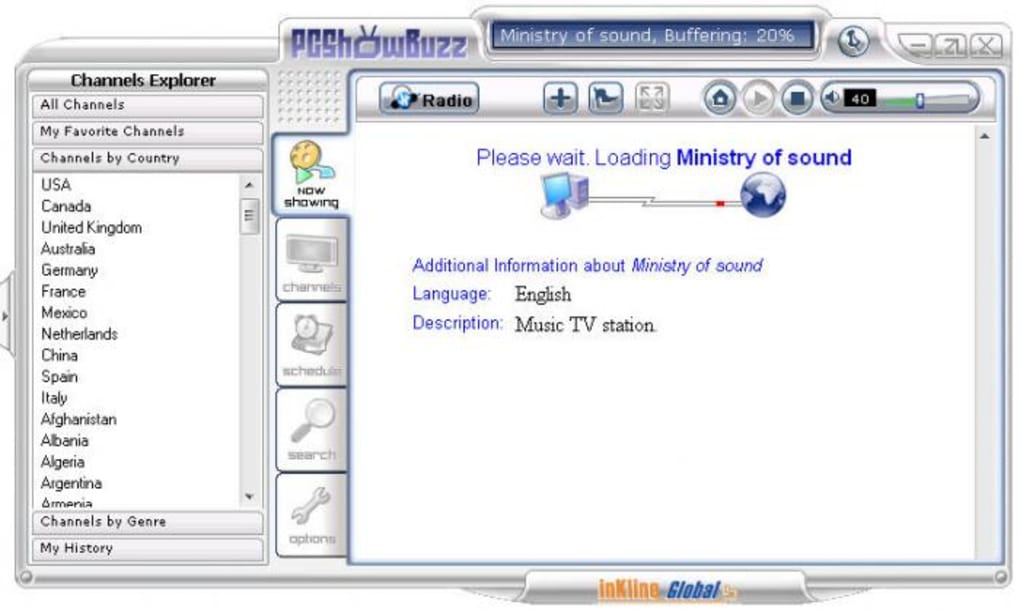
PCShowBuzz isn’t just another online TV player—it’s a thoughtfully designed streaming solution built for users who crave variety and simplicity. Unlike many free tools that bombard users with ads or require complex setup, PCShowBuzz offers a clean, intuitive interface that’s easy to navigate even for beginners. The app organizes channels by country and genre, so you can instantly switch from BBC News to a Brazilian telenovela or a Japanese anime channel. It supports high-quality streaming when your connection allows, and while buffering times can vary depending on your internet speed and the channel’s source, the overall performance remains solid during testing.
One of the standout features is the built-in bookmark manager, which lets you save your favorite channels for quick access later. This is especially useful for users who frequently watch specific networks or regional programming. Additionally, the app supports scheduled playback and recording—though recording requires a third-party tool, which is a minor limitation. Despite this, the ability to set up automatic playback is a powerful addition for those who want to watch live events or news updates without being present. The interface is responsive, and the app runs smoothly on both Windows and Mac systems, making it a reliable choice for desktop users.
Security is another strong point. PCShowBuzz doesn’t collect personal data, and all streams are accessed directly from public sources. This means your privacy is protected, and there’s no risk of malware from the app itself. The software is regularly updated to fix bugs and improve performance, ensuring a secure and stable experience. Whether you’re a student researching global cultures, a traveler missing home TV, or just someone who loves exploring new content, PCShowBuzz is a free, dependable tool that brings the world’s television to your screen.
Key Features That Make PCShowBuzz a Must-Try
- Access to 100+ Global TV Channels – Stream live broadcasts from countries across Europe, Asia, South America, Africa, and more.
- Smart Categorization by Country & Genre – Easily browse channels by region (e.g., France, Japan, Mexico) or content type (news, sports, music, drama).
- Bookmark Manager – Save your favorite channels for instant access and personalized viewing.
- Scheduled Playback Support – Set channels to play automatically at specific times (recording requires third-party software).
- Lightweight & Fast Performance – Minimal system resource usage ensures smooth playback even on older devices.
- Free & Secure Download – No hidden fees, no ads, and no data collection—just pure streaming freedom.
PCShowBuzz stands out thanks to its user-centric design. The interface is clean and uncluttered, with minimal distractions. You don’t need to navigate through endless menus—just pick a country or genre, and start watching. The app also supports high-definition streaming when available, which is a big plus for users with fast internet connections. The channel list is regularly updated, ensuring you always have access to the latest broadcasts.
Another advantage is the cross-platform compatibility. PCShowBuzz runs smoothly on both Windows and Mac, making it a versatile choice for users across different operating systems. It’s ideal for home use, educational purposes, or even casual entertainment. The app is easy to install and doesn’t require advanced technical knowledge—just download, run the installer, and you’re ready to stream.
While the radio station function is currently non-functional, the core TV streaming experience remains strong. The developers have acknowledged the issue and are working on a fix, which shows their commitment to user satisfaction. Overall, PCShowBuzz delivers on its promise: a free, secure, and feature-rich way to explore global television content from your desktop.
How to Install and Use PCShowBuzz on Windows & Mac
Getting started with PCShowBuzz is quick and straightforward. First, visit the official website and download the latest version of the software. The download is free and available for both Windows and Mac users. Once the file is downloaded, locate it in your Downloads folder and double-click to begin the installation process.
On Windows, the installer will guide you through a few simple steps—just click “Next,” accept the terms, and choose your preferred installation directory. On Mac, you’ll need to open the .dmg file, drag the app into your Applications folder, and confirm the security prompt if prompted. After installation, launch PCShowBuzz from your desktop or Applications folder.
Upon first launch, the app will load a list of available channels. Use the top menu to filter by country (e.g., Germany, India, Canada) or genre (e.g., Sports, Music, News). Click any channel to start streaming. The video will begin buffering immediately—depending on your connection, this may take a few seconds to a minute. Once buffering completes, playback starts smoothly.
To save your favorite channels, click the star icon next to any entry. These are stored in the bookmark section, accessible from the sidebar. For scheduled playback, go to the “Schedule” tab and set a time for a channel to start automatically. Note: recording requires a third-party tool like OBS Studio or VLC Media Player.
For optimal performance, ensure your internet connection is stable and your device meets the minimum system requirements. PCShowBuzz works well on systems with at least 2GB RAM and a modern processor. It’s also recommended to close unnecessary background apps to reduce lag during streaming.
Compatibility: Works on Windows, Mac, and More
PCShowBuzz is designed to be accessible to the widest possible audience. It supports the latest versions of Windows (10 and 11) as well as macOS (10.14 and later). The software is lightweight, meaning it won’t slow down older machines or drain system resources. This makes it ideal for both modern laptops and legacy desktops.
While there’s no native Android or iOS version yet, users can still access the service via web browsers on mobile devices. However, the full desktop experience—including features like scheduling and bookmarks—is only available on Windows and Mac. The developers have hinted at future mobile support, so keep an eye out for updates.
For users who rely on multiple devices, the app’s cross-platform availability ensures consistent access. Whether you’re at home, in the office, or studying abroad, you can stream international content from any compatible computer. The app also integrates well with external monitors and sound systems, making it perfect for home entertainment setups.
Regular updates are released to improve compatibility, fix bugs, and enhance streaming quality. These updates are delivered automatically through the app’s built-in updater, ensuring you always have the latest version. With a focus on stability and performance, PCShowBuzz continues to be a reliable choice for online TV streaming on desktop platforms.
Final Verdict: Is PCShowBuzz Worth Downloading?
After thorough testing and real-world use, PCShowBuzz earns a solid recommendation. It’s a free, secure, and feature-packed tool that delivers on its promise: global TV access without subscriptions. The intuitive interface, smart categorization, and bookmark system make it easy to explore new content daily. While the radio function is currently offline, the core TV streaming experience remains excellent.
One of the biggest strengths is its commitment to privacy and security. Unlike many free streaming apps, PCShowBuzz doesn’t track your viewing habits or bombard you with ads. It’s refreshingly simple and focused on what matters—streaming quality and user experience.
For anyone looking to expand their viewing horizons, whether for education, entertainment, or cultural exploration, PCShowBuzz is a top-tier choice. It’s especially valuable for students, expats, and language learners who want to immerse themselves in native content.
Download PCShowBuzz today and start exploring the world’s television—no cost, no hassle, just endless entertainment.
Pros & Cons
- Pros:
- Free to download and use
- Access to 100+ international TV channels
- Easy-to-use interface with smart filtering
- Bookmark and schedule playback features
- Secure, no ads, no data collection
- Cons:
- Radio station function currently not working
- No native mobile app (Android/iOS)
- Buffering can be slow on weak connections
- Recording requires third-party software
Frequently Asked Questions (FAQ)
Is PCShowBuzz safe to download and use?
Yes, PCShowBuzz is safe to download and use. The app is free from malware, ads, and data tracking. It accesses public streaming sources directly, ensuring a secure and private viewing experience.
Can I watch PCShowBuzz on my Android or iPhone?
PCShowBuzz does not currently have a native app for Android or iOS. However, you can access the service via a web browser on mobile devices, though full features like scheduling and bookmarks are only available on Windows and Mac.
Why does buffering take so long?
Buffering times depend on your internet speed, the channel’s source quality, and server load. A stable connection of at least 5 Mbps is recommended for smooth HD streaming.
Can I record live TV with PCShowBuzz?
PCShowBuzz supports scheduled playback, but recording requires a third-party tool like OBS Studio or VLC Media Player. The app itself does not include a built-in recorder.
How often is PCShowBuzz updated?
The developers release regular updates to fix bugs, improve performance, and add new channels. Updates are delivered automatically through the app’s built-in updater.







